HTTP Request
The HTTP Request node is one of the most versatile nodes. It allows you to make HTTP requests to query data from apps and services.
Authentication: there are several options for authentication:
- Basic Auth
- Digest Auth
- Header Auth
- OAuth1
- OAuth2
- None
After you select the needed authentication method you need to choose or create credentials (except when there is no authentication). To create new credentials click on search credentials then click on 'add'
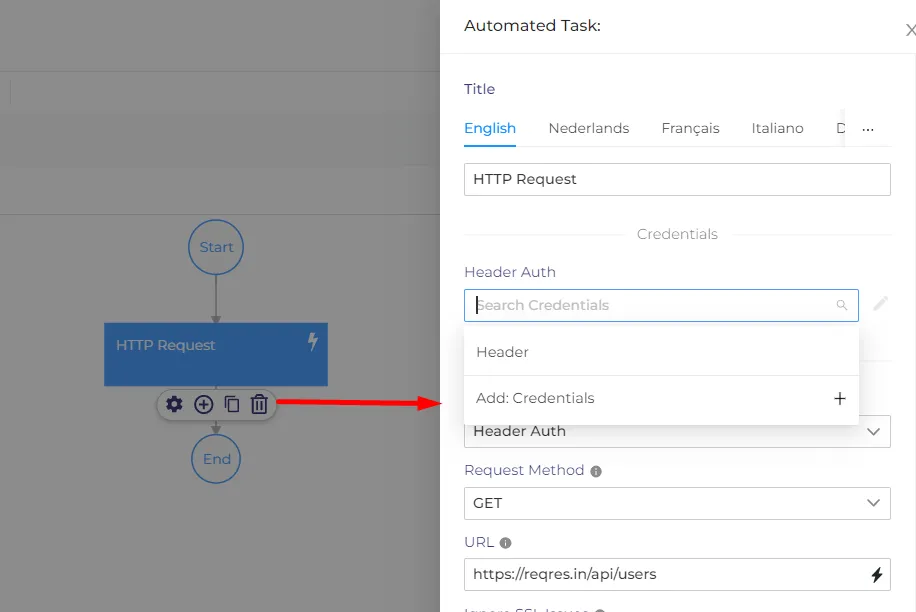
After the credentials are created they can be used in other processes or nodes.
Request Method: Select the method to be used for the request:
- DELETE
- GET
- HEAD
- PATCH
- POST
- PUT
URL: The full URL of the request.
Ignore SSL Issues: Download the response even if SSL validation isn't possible.
Response Format: Select the format in which the data gets returned from the URL. You can choose between File, JSON, and String.
JSON/RAW Parameters: Whether to set the body/query parameter using the value-key pair UI (disabled) or JSON/RAW (enabled). When using JSON/RAW, the Header field requires a JSON object.
Options:
- Batch Interval: The time (in milliseconds) between each batch of requests. Set to 0 to disable.
- Batch Size: If set, the node splits the input into batches to throttle requests. Use -1 to disable.
- Full Response: Retrieve the full response instead of just the body from the URL.
- Follow Redirect: Follow any redirects with a status code 3xx.
- Ignore Response Code: Let the node execute even when the HTTP status code isn't 2xx.
- Proxy: Specify an HTTP proxy that you may want to use.
- Split Into Items: Flatten the node output as a simple array. See the Examples section to learn more.
- Timeout: The maximum time (in ms) to wait for a response header from the server before aborting the request.
- Use Querystring: Set this option to true if you need arrays serialized as foo=bar&foo=baz instead of the default foo[0]=bar&foo[1]=baz.
- Headers: Specify any optional HTTP request headers you may want to include with your request. the keys can be computed.
- Query Parameters: Specify any HTTP query parameters you may want to include with your request.