Implementation description
5 min
Overall internal flow diagram
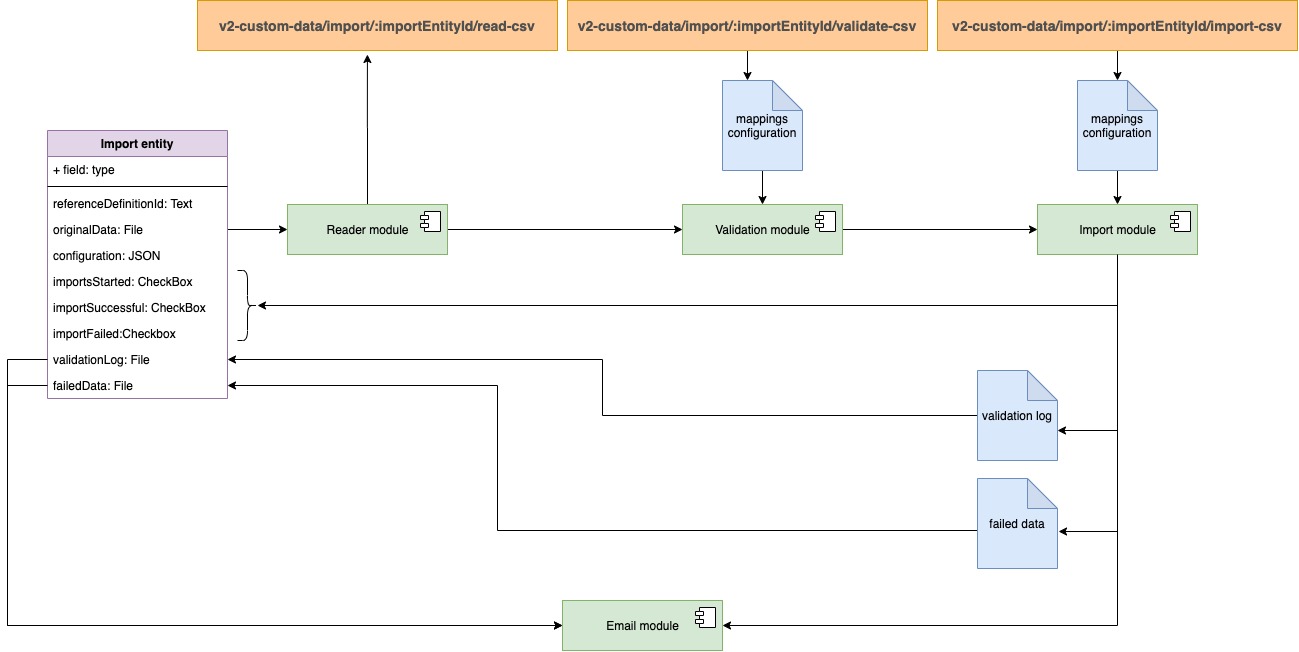
Workflow diagram
Api calls
Start background import process
This endpoint starts background import process
POST
v2-custom-data/import/:importEntityId/import-csv
fetch("https://api.cakes.com", {
  "method": "GET",
  "headers": {
    "Accept": "application/json"
  }
})
.then(response => {
  console.log(response);
})
.catch(err => {
  console.error(err);
});
Mapping configuration types definition
Mapping configuration defines how to process particular column of CSV file depend on mapped entity type. Every entity mapping property has generic filed such as csvColumnIndex, which defines the column index, current property is linked to, as well as every mapping property may have its own attributes to precise rules how to resolve data located in particular column.
/**
 * Generic property mapping definition
 */
export type GenericPropertyMapping = {
  // csv filed which current property links to
  csvColumnIndex?: number;
};
/**
 * Plain text property mapping definition. For the time being it
 * does not use any custom propertites, so use just generic ones
 */
export type PlainTextPropertyMapping = GenericPropertyMapping & {};
/**
 * List property mapping. Custom fields are used:
 *    listSeparator - defines symbol to split value and create an
 *                    array of items
 */
export type ListPropertyMapping = GenericPropertyMapping & {
  listSeparator: string;
};
/**
 * Date property mapping. Custom fields are used:
 *    dateFormat - the rule how to convert string into the date object
 *    timezone - defines what time zone data value reflects to
 */
export type DatePropertyMapping = GenericPropertyMapping & {
  dateFormat: string;
  timezone?: string;
};
/**
 * Number property mapping. Custom fields are used:
 *    thousandSeparator - defines thousand separator symbol, is used
 *                        for proper convertion string to number
 *    decimalSeparator  - defines decimal separator symbol, is used
 *                        for proper convertion string to number
 */
export type NumberPropertyMapping = GenericPropertyMapping & {
  thousandSeparator?: string;
  decimalSeparator?: string;
};
/**
 * Entity property mapping. Custom fields are used:
 *    definitionId  - definition id this property is linked to
 *    propertyId    - the property, which is used to find the endity by the
 *                  value provided in CSV column
 *    listSeparator - defines the list separator symbol in case if the
 *                  entity has list = true property
 */
export type EntityPropertyMapping = GenericPropertyMapping & {
  definitionId: string;
  propertyId: string;
  listSeparator?: string;
};
/**
 * Link property mapping. Custom fields are used:
 *    displayText - which text will be output instead of showing url.
 */
export type LinkPropertyMapping = GenericPropertyMapping & {
  displayText?: string;
};
/**
 * Check boc property mapping. Cusom fields are used:
 *    true  - value that will be considered as true
 *    flase - value that will be considered as false
 */
export type CheckBoxPropertyMapping = GenericPropertyMapping & {
  true?: string;
  false?: string;
};
/**
 * Phone property mapping. Does not have any custom properties
 */
export type PhonePropertyMapping = GenericPropertyMapping & {};
/**
 * Email property mapping. Does not have any custom properties
 */
export type EmailPropertyMapping = GenericPropertyMapping & {};
/**
 * JSON property mapping. Does not have any custom properties
 */
export type JSONPropertyMapping = GenericPropertyMapping & {};
/**
 * General Property Mapping type consist of a union of all types
 * belov
 */
export type PropertyMapping =
  | PlainTextPropertyMapping
  | ListPropertyMapping
  | DatePropertyMapping
  | NumberPropertyMapping
  | EntityPropertyMapping
  | LinkPropertyMapping
  | CheckBoxPropertyMapping
  | PhonePropertyMapping
  | EmailPropertyMapping
  | JSONPropertyMapping;
/**
 * CSVImportSettings
 *     uniquePropertyId   - when defined importer module will try to find exisitin
 *                        entitiy to define is it required to create or update item
 *      propertyMappings: - defines the rules how the data will be validated and
 *                        resolved depend on each protpery
 */
export type CSVImportSettings = {
  uniquePropertyId: string | undefined;
  propertyMappings: {
    [propertyId: string]: PropertyMapping;
  };
};