Website logo
FAQBook demo
HyperPortal documentation - Home
🔐Login process
📰Header
🏦CRM features
Organizations & Contacts
Groups
Permissions
💾CMS
Activity
Conditional display properties
Quick Actions
Timeline tab
Data history tab
Activity/Ad-Hoc tasks
Kanban view
Bulk operations with items (update/delete)
Computed expressions
Detailed View
List view
Entity creation/managment
Filters
Email logs
📊Dashboards
Global dashboard filters
Table widget
Charts
Activity Widget
Workflows tasks widget
Access to Dashboards
🚀Wоrkflоws
History
Dashboard
Processes
Tasks aka Nodes
Workflow templates
Adobe Sign via workflows
🛠️Templates
Emails
Fоrms
Documents
⚙️Settings
Tenant Configuration
CMS/Workflows
Email blacklist
Statistics
VoIP settings
GDPR settings
Domains
API key
Webhooks
⁉️F.A.Q
Mailings
🧱HyperBuilder
⚡Quick start
Structured SEO schema configuration
Blocks
Docs powered by Archbee

Settings

1 min

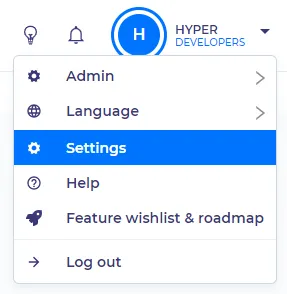
To go to the settings page, expand the 'User dropdown menu' and select the menu item 'Settings'.
Document image


The opened page displays a menu on the left side with access to the following items (you can read more about each item in the related article):
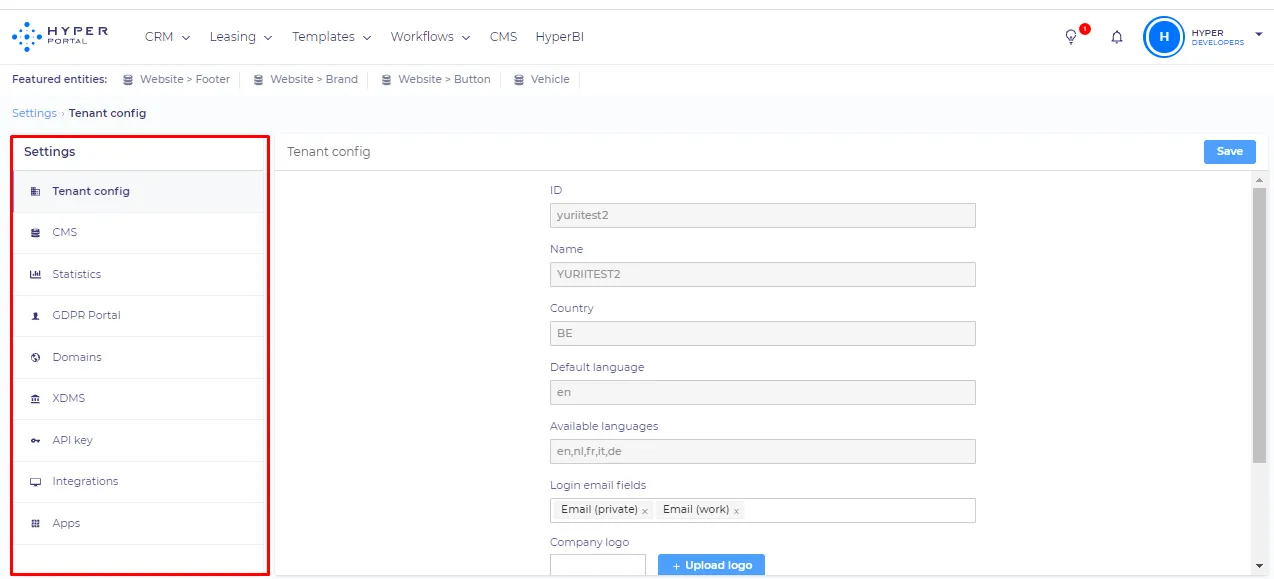
  • Tenant config 
  • CMS 
  • Statistics 
  • GDPR Portal 
  • Domains 
  • XDMS
  • API keys 
  • Integrations 
  • Apps
Document image


Updated 16 Jul 2026
PREVIOUS
Documents
NEXT
Tenant Configuration
Docs powered by Archbee