Structured SEO schema configuration
Introduction
Structured data integration has been implemented to improve the SEO results of our sites, built with HyperBuilder.
Adding structured data can enable search results that are more engaging to users and might encourage them to interact more with your website, which are called rich results. More details on Google Documentation.
The implementation includes three types of structured data schema configurations: 1. Basic schema: "WebSite" and "Organization" 2. Custom page schema 3. Generated "JobPosting" schema for the "Vacancy Details" block
Configurations Overview
Basic schema: "WebSite" and "Organization"
The goal of the site name in Google Search is to best represent and describe the source of each result. To indicate your site name preference, added "WebSite" structured data.
Adding "Organization" structured data to your website can help Google better understand your organization's administrative details and disambiguate your organization in search results.
For these schemes to be generated on the pages, the names and descriptions must be filled in the application settings.
- Go to App settings > SEO > Schema configuration
- When part of "WebSite" or "Organization" schema is not filled in with values, the schema will not be generated.
- Fill in the corresponding name and description for "WebSite" and "Organization".
- Should be filled for each language
- Save changes
WebSite name- The name of the website. Make sure the name meets the guidelines for choosing your site name.
WebSite description - Describes the website, not the company, legally. Do not copy the meta description 1:1 (you can, but it is better to summarise it slightly).
Organization name - The name of your organization. Use the same name that you're using for your site name.
Organization legal name - The registered, legal name of your Organization, if applicable and different from the name property.
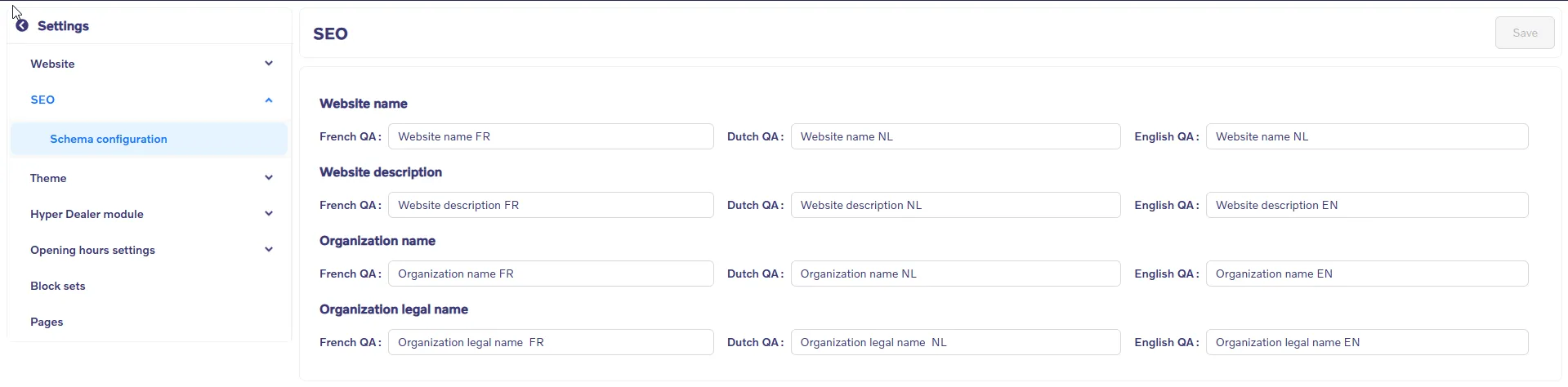
- When the values are filled in, a schema will be generated for the pages with the following parameters:
Custom page schema
A custom schema allows you to add appropriate structured data features for a specific page.
- Open the HyperBuilder App > Click on page settings icon > In the page setting side menu placed input field "Custom page schema (JSON-LD)"
- Via hover on the label, a tooltip is displayed with a link to the Google documentation.
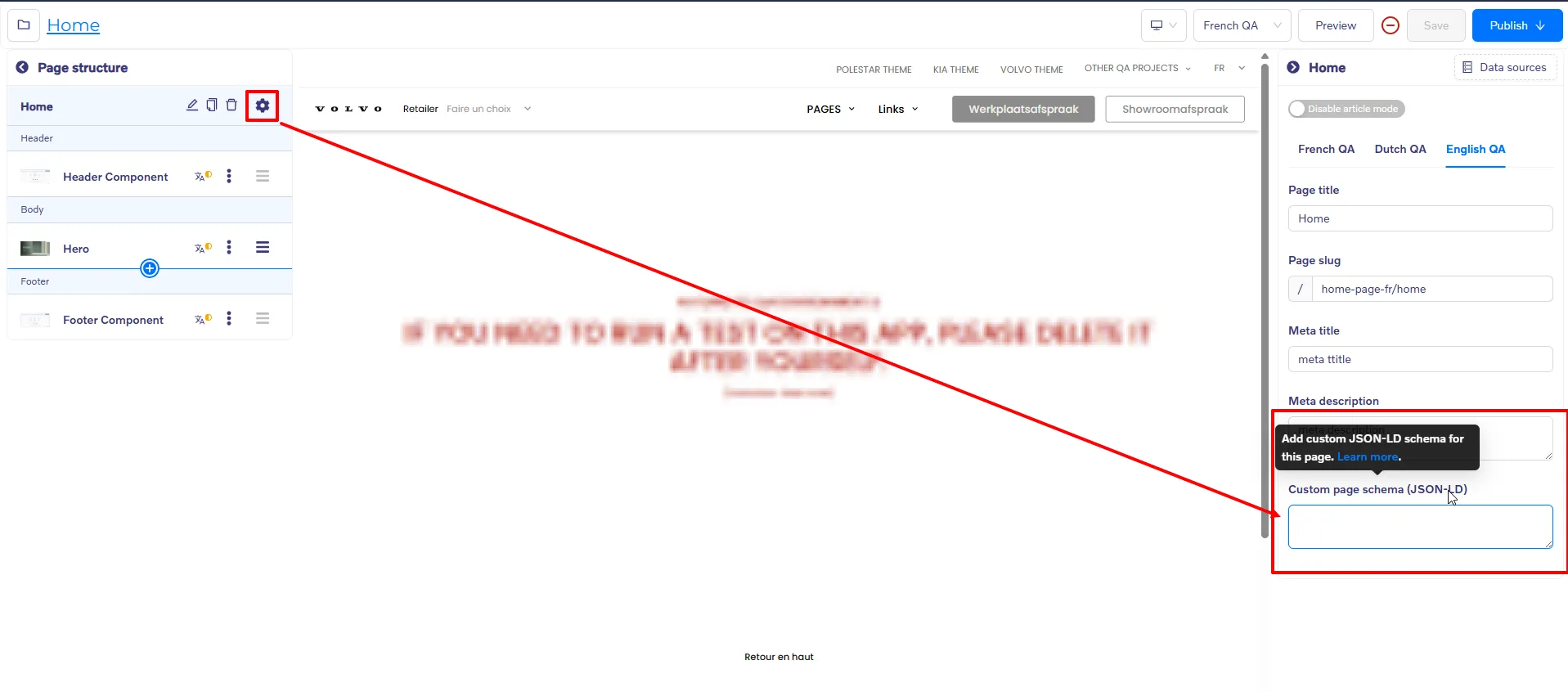
- For examle you can fill in "WebPage" schema
- Should be filled for each language
- Save changes
- When custom page schema is filled in, a schema will be generated only for the current page.
- If values for "WebSite" and "Organization" are filled, the custom schema will be added as a part of the main schema.
- { "@context": "https://schema.org", "@graph": [ { "@type": "WebSite", "@id": "yurii-builder-fpifkflmagugmtizgvnzv.staging.draft.hyperbuilder.io", "url": "https://yurii-builder-fpifkflmagugmtizgvnzv.staging.draft.hyperbuilder.io/", "name": "Website name NL", "description": "Website description EN", "publisher": { "@id": "https://yurii-builder-fpifkflmagugmtizgvnzv.staging.draft.hyperbuilder.io/" }, "inLanguage": "en" }, { "@type": "Organization", "@id": "https://yurii-builder-fpifkflmagugmtizgvnzv.staging.draft.hyperbuilder.io/", "name": "Organization name EN", "legalName": "Organization legal name EN", "url": "https://yurii-builder-fpifkflmagugmtizgvnzv.staging.draft.hyperbuilder.io/", "logo": { "@type": "ImageObject", "url": "https://images.hyper1.net/eyJrZXkiOiJ5dXJpaS1idWlsZGVyL2J4eUpKZWRyUFFTbmZTU19LS1BOcyIsImVkaXRzIjp7InJlc2l6ZSI6eyJmaXQiOiJpbnNpZGUiLCJ3aXRob3V0RW5sYXJnZW1lbnQiOnRydWV9LCJ3ZWJwIjp7InF1YWxpdHkiOjcwLCJyZWR1Y3Rpb25FZmZvcnQiOjUsImFscGhhUXVhbGl0eSI6MTAwfX0sIm91dHB1dEZvcm1hdCI6IndlYnAifQ==" } }, { "@type": "WebPage", "@id": "https://example.com/page_slug", "name": "Some title", "description": "Some description", "url": "https://example.com/page_slug", "isPartOf": { "@id": "https://example.com/#website" }, "primaryImageOfPage": { "@id": "https://example.com/sample-post/#primaryimage" }, "datePublished": "2025-08-26", "inLanguage": "en-US" } ] }
Block-level schema
In the current implementation, it was planned to add "JobPosting" schema generation for the "Vacancy Details" block.
- At the block level, values in the schema are filled in based on vacancy data.
- When the page is rendered with the "Vacancy Details" block, the "JobPosting" schema is generated with the details from the current vacancy.
- If values for "WebSite" and "Organization" are filled, the "JobPosting" schema will be added as a part of the main schema.
- If values for "Organization" are filled, the parameters for "hiringOrganization" in the schema will be based on "Organization" schema data.
- If values for "Organization" are NOT filled, the parameters for "hiringOrganization" in the schema will be based on vacancy data.