Promotion prices
General
Toyota and Lexus both have a general discount section also, whereby if there are 0 matches in the users given input we give a default discount of x% (user chooses) to that vehicle.
We fetch the vehicles from HyperPortal every hour. We use the scheduled importer to import each time after the normal import should have run, at the moment this is 3 times a day
Ciac Ford
Link
Logic is based on 'Model' and part of the 'Vehicle description'. Because of the part of vehicle description we need there is an extra tab 'Description fetcher'. In this tab we take the version description of the vehicle (from the import file), which we lower case, and use this formula:
=IF(ISBLANK(A2),"", IF(REGEXMATCH(A2,"mhev"), "mhev", IF(REGEXMATCH(A2,"phev"), "phev", IF(REGEXMATCH(A2,"fhev"), "fhev", IF(REGEXMATCH(A2,"raptor"), "raptor", "")))))
This formula just tries to extract matching version descriptions that the customer gave. Ideally we need to get a more dynamic function that uses the customers input to seek matching values. At the moment every time a new type comes out this list needs to get expanded. In the 'Discount Calulcation' we concat: - 'results » productLine » title' from vehicle import - 'finder' column that we described above
Based on this we will find matches and apply discounts
Ciac Lexus
Link
This one is very simple they just look at the model of the vehicle. So in the discount 'Discount calculation' we just use 'results » productLine » title' to match what the user inputed in his first sheet.
Ciac Toyota (Aalst/Gent)
Here the user can give in 3 values: - Model - Fuel - Version
Since 'Version is unique (as opposed to version of Ford) we create a function whereby we IF the 'Version' is filled in, we use that or else we concat the 'Model' and 'Fuel'
In the 'Discount calculation' we concat (all from import file): - 'results » productLine » title' - 'results » fuel » title' - 'results » versionDescription'
Since the logic is made up quite easily we can easily match the concat of this with the concat in the first sheet to apply discounts.
ToDo
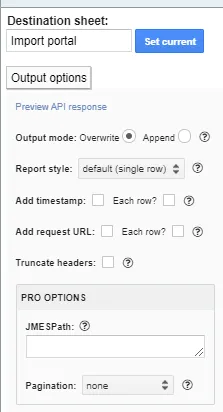
With output options we can make sure we only output the data we really want and in always in the same order e.g.:
results[].{entityId:entityId,productLine:productLine}This will make sure that the google sheet cannot fail anymore (which has happened 2 times so far)